Yet another way to compute import (east) and export (eait). Another method uses the binary min and max functions of the calculator:
east = grid max 0
eait = (grid min 0) abs
But a word of caution with either of these. When you use them for instantaneous values in the status display, they are absolutely valid. But when you use them to determine import and export over time , they become less accurate as the time intervals increase. They work fine to plot usage, generation, import and export over the course of a day, where the intervals are 2 minutes.
If you use them to look at your import and export over a month, they will be way off. The reason is that “grid” is a net amount over the interval. If the intyervals are one hour, you could easily have exported say 3 kWh and imported 1 kWh, but the net “grid” in the calculation for that interval will be 2 kWh. So your export will be 2 kWh and your import will be zero kWh.
There are ways to capture the real details, but they require either sacrificing an input or using uploading to an external database. I highly recommend that solar users consider using the free (donations welcome) service PVoutput. It is very simple to setup IoTaWatt to send data there, and they provide both a browser interface and a phone app to view the data.
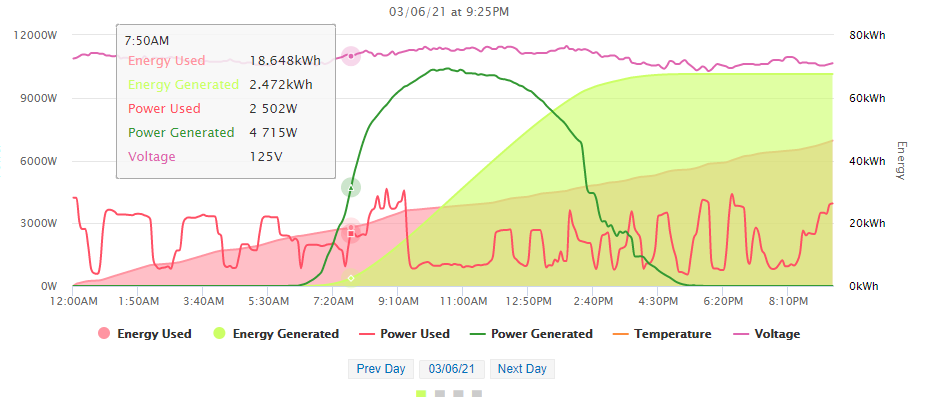
Here’s a typical daily “live” display:
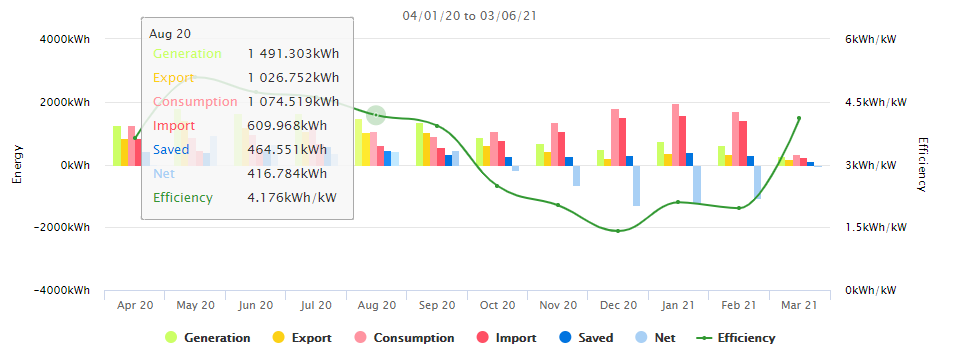
You can see summaries by week or month. This installation has been uploading for a couple of years, so I can take a monthly look for the past year. Simply moving the cursor over any month gives me accurate totals for generation, consumption, import, export and saved which is the amount of generated power used directly.
Looking at today is easy with Graph+, but long term analysis of the PV dynamic would be reinventing the wheel. This is an excellent tool and it’s free.