Hi, just happened to notice that my unit is rebooting everyday and trying to figure out why? Here is the log from the last couple days.
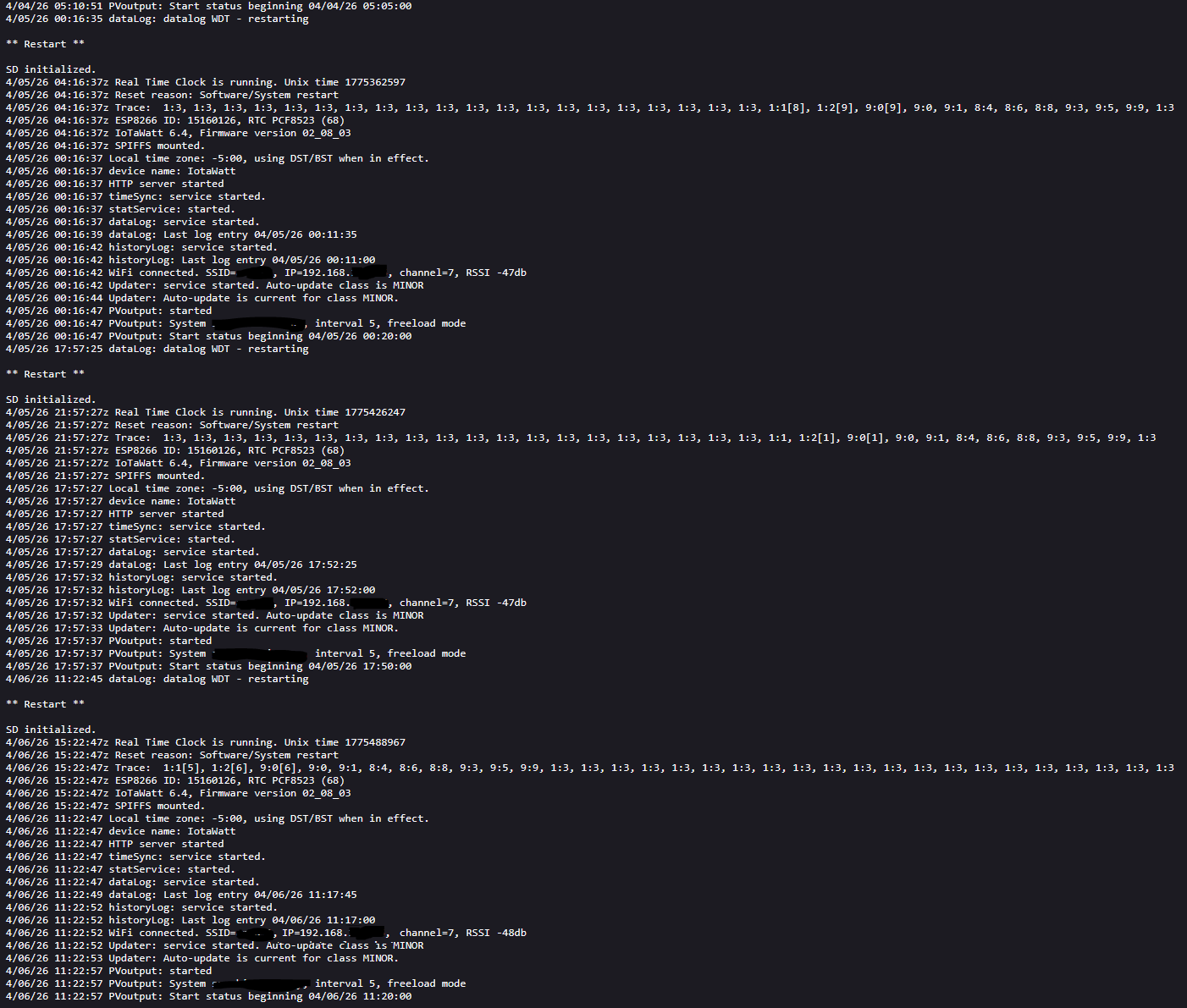
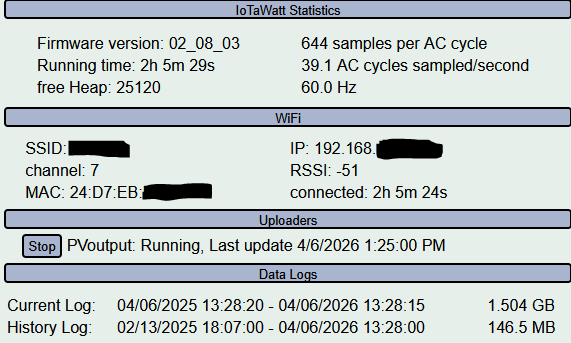
Datalog Watch Dog Timer (WDT) exception is very rare. The datalog WDT will trigger if the datalog is not updated after 5 minutes. There is not much information available to diagnose what is causing this, but I can offer some possibilities:
The trace indicates that the web-server was active at the time of the WDT expiration. Because of the single -thread operation of the ESP8266, the web server monopolizes the CPU when handling a transaction. For the most part, transactions are handled relatively quickly and have little or no impact on sampling and data recording. However, there are some requests that can take extra time to handle. In particular, queries can take a long time as they can require reading a lot of data from the SDcard. For that reason, queries length is limited by default but there is an overide LIMIT parameter that will allow longer queries. If you are using query explicitly you might check the response times for those queries (the browser debugger will time transactions). Even if not doing explicit queries, the home assistant integration uses query to gather IoTaWatt data. There could be some issue with that. A simple test would be to disable the integration for a day or so and see if the problem is mitigated.
I wouldn’t rule out datalog corruption or SDcard issues but there is no direct historical link to those types of problems and datalog WDT restarts, so HA involvement would be my first choice.
K, will disable the HA integration and see. Thanks.
So I disabled the HA integration and I still see it happening (last 2 days). Anything else I could try before doing something with the SDcard?
Don’t have any ideas. SDcard would be my next step.
Would it hurt leaving it alone other than the possibility of the SDcard failing?
I wonder if I got a bad one since it has been only a year of having it.
Don’t know. When the datalog times out it had no entries for five minutes, which means no data logging. It’s possible that whatever is causing the timeout occurs much more frequently but doesn’t quite last five minutes, thus leaving holes in your log and skewing the log data.
Thinking more about this, the datalog Service runs at a high priority and should never miss a single 5 second tic, much less 60 of them. Right now I’m thinking it may be WiFi related. The trace shows the web-server is the last thing called before the timeout. It’s possible that’s the problem - probably more likely than an SDcard issue.
If you want to try that, I’d recommend that you disconnect the unit from WiFi from the Tools->>WiFi menu. The LED should go dull red. Leave it that way for two days. You will not be able to access it but it will still be running and should be logging.
After two days (MTBF seems to be less than 24 hours), power cycle the unit. You will get RGG LED so follow the docs to connect it back to your WiFi. Once connected (dull green led) look at the message log to see if it restarted during the disconnected period.
2 Likes
So I checked the log this morning (HA integration still disabled) and the highlighted message came up (heap memory has degraded below safe minimum, restarting. RSSI was -45db).
Does that help narrow anything down?
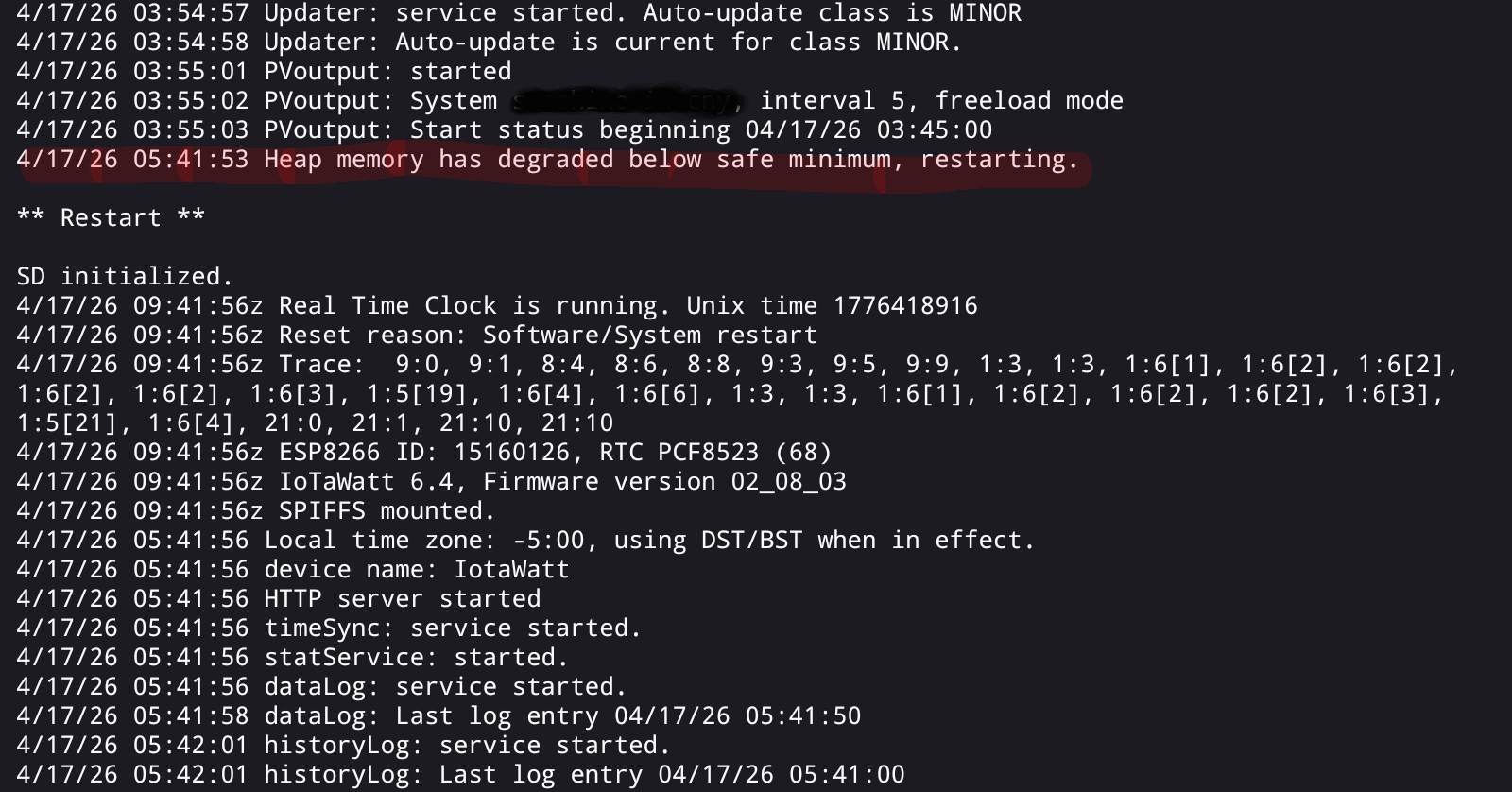
Well it reinforces the WiFi suspicion. Heap memory degradation is almost always associated with WiFi issues. I don’t believe there are any memory leaks in the IoTaWatt firmware, so my assumption is that there is one in the IP stack, probably the LWIP code supplied with the ESP8266/Arduino IDE, and it seems associated with exception handling.
It usually happens with poor RSSI, but there have been some cases reported where the RSSI very good like yours. Maybe too good. In any event, have you tried the disconnect experiment the I suggested above?
So the heap memory error only showed up that one time (I checked again this morning and it did its usual WDT restart…)
I did disconnect it this morning (got the dull red light) and will give it a few days and then power cycle etc, like you mentioned.
1 Like
I reconnected the device yesterday and it didn’t show any reboots other than it trying to connect to WiFi “4/21/26 16:08:00 WiFi disconnected more than 60 minutes, restarting.” So I don’t know if it did a WDT reboot as the log only went back a few hours. Is there a way to go back further?
This morning I checked the log and it showed a WDT reboot. 
I forgot about that. Probably should not do the restart if WiFi is not configured, but that doesn’t help you now.
Yes, there is. When you display the log using Tools → Message Log, IoTaWatt simply requests the last 10,000 characters of the log and your browser displays it. You will see a URL something like:
http://iotatest.local/iotawatt/iotamsgs.txt?textpos=-10000
Notice the query portion of the URL “&testpos=-10000” indicating the last 10000 characters. You can alter that URL and refresh to go back deeper by increasing the character lookback. Try -100000.
Given the hourly restarts, my sense is that if there are no WDT restarts shown it could be a false negative but if there is a WDT restart while WiFi was disconnected I would say it strongly suggests WiFi is not the problem.
1 Like
Checked the log for past 100000 entries. You are correct, the hourly restarts showed no WDT restarts. It would be nice to not have it restart every hour in that case 
I might play around with my wireless. Is WPA3 supported?
Not sure with the current version, but it is probably more about using channel 7 which is an overl;apping channel. The favored are 1, 6 and 11. Also, the RSSI is VERY strong. Maybe putting some distance between the AP and the IoTaWatt would help or reducing the AP signal strength if you have control over that.
The router is set to auto channel based on interference (has been since I got the IoTaWatt). I’ll run a scan when I have some time and set that SSID for one of the less busier channels (1,6,11).
Unfortunately it isn’t possible to move the AP or the IoTaWatt .
As I understand it, it’s not so much about being busy as the favored channels do not overlap their bandwidth with other channels:
The 2.4 GHz WiFi band operates between 2.400 GHz and 2.500 GHz, divided into 14 channels (1-14) that are 20 MHz or 22 MHz wide. Channels are spaced 5 MHz apart, with center frequencies ranging from 2.412 GHz to 2.484 GHz. To minimize interference, it is recommended to use non-overlapping channels 1, 6, or 11.
2 Likes
In addition to only using 2.4GHz WiFi channels 1, 6, or 11, it is also important to set the 2.4GHz radio channel width to 20MHz. This provides the least amount of overlapping interference. This will reduce the maximum bandwidth for the 2.4GHz clients, but since most of those these days are IoT devices (i.e. low bandwidth users, typically), it will not make any real difference in practical usage terms.
High bandwidth clients should be on 5GHz or 6Ghz radios.
2 Likes
I changed the AP settings to channel 1, lowered the transmit power (to lowest setting) and also changed the channel width to 20MHz. Will see how it goes the next few days. The RSSI went up slightly from ~-48db to -53db (at lowest transmit power).
Are there any mods to add ethernet? I put in ports near the panel years ago when my TED was working. I was reading another thread about it on here and just curious.
1 Like
An update… I let it run a few days with the changed settings and it still is doing the restarts. 
My sense is that it’s still WiFi, or at least something caused by a WiFi transaction. If you have access to another router, I’d suggest activating it with a different SSID, disconnect your IoTaWatt from the house WiFi and connect it to the new one as the only device on the router. It does not have to be connected to the internet.
You can connect your phone or laptop to the new router when you want to look at the message log. If it fails in that environment, I think it would definitively rule out WiFi. Couple of days would be a good test and HA should not be accessing the IoTaWatt.
That about exhaust my ideas for field diagnosis. It looks like you are in New York, so if you want me to take a look at it you can send it to me and I’ll test it here. If it fails I’ll fix it. If not at least you will know it’s something in your environment. PM me if you want to send it in.