Wi-Fi disconnection

For several weeks now, my iotawatt has been giving me Wi-Fi problems.
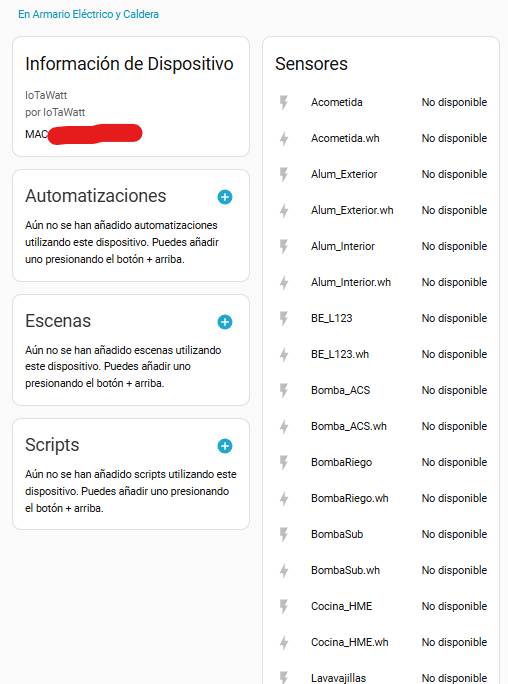
It’s connected to Home Assistant, and it keeps losing connection.
I have to restart the device and check the IP address assigned by the router locally and reconfigure it. But the next day, the problem persists.
I’ve assigned a static IP address using the MAC address, but that also gives me problems.
I’ve changed the 5VDC power supply, but nothing has worked.

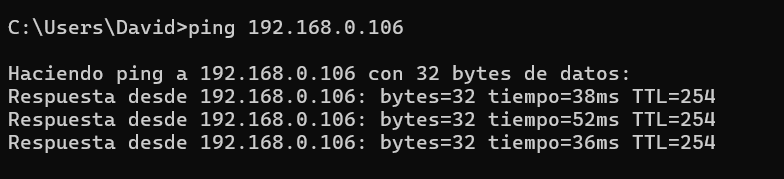
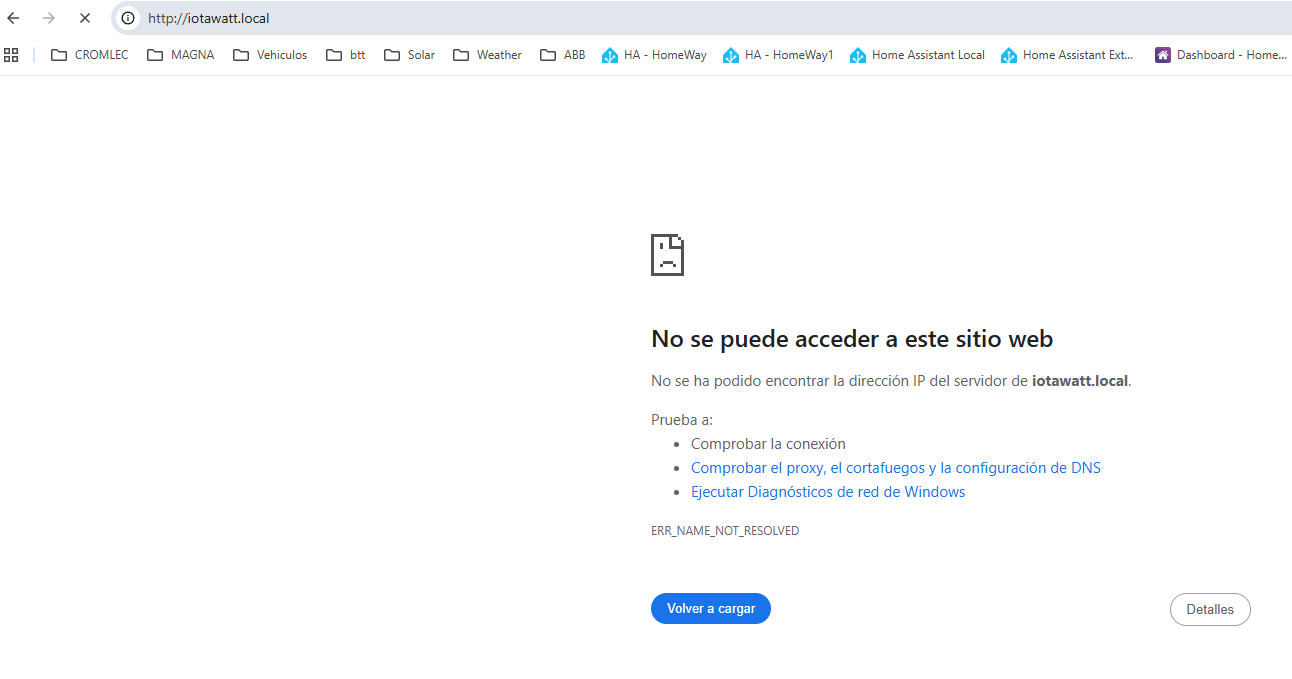
I try to access it locally at http://iotawatt.local/, but it doesn’t connect, although the device can still ping. I have to unplug the device, but after a few hours, the problem returns.

Is anyone else experiencing this problem?

Thanks a lot.

Has anything changed with your WiFi, including firmware update?

Probably a red-herring but was it working with HA before this started happening?

Not clear on this. What exactly did you reconfigure.

Assigning a static LAN IP is pretty standard. Are you saying that doing so causes different problems?

This smells like a router problem managing the zeroconfig (.local) protocol. Is the channel of your AP fixed? If you have multiple APs, is the IoTaWatt bound to one of them?

** Restart **

SD initialized.
3/14/26 22:55:34z Real Time Clock is running. Unix time 1773528934 
3/14/26 22:55:34z Reset Reason: Power-fail restart.
3/14/26 22:55:34z ESP8266 ID: 15866494, RTC PCF8523 (68)
3/14/26 22:55:34z IoTaWatt 5.0, Firmware version 02_08_03
3/14/26 22:55:34z SPIFFS mounted.
3/14/26 22:55:34z Local time zone: +0:00
3/14/26 22:55:34z device name: IotaWatt
3/14/26 22:55:37z Connecting with WiFiManager.
3/14/26 22:55:42z HTTP server started
3/14/26 22:55:42z WiFi connected. SSID=xx, IP=192.168.xx, channel=1, RSSI -58db
3/14/26 22:55:42z timeSync: service started.
3/14/26 22:55:49z statService: started.
3/14/26 22:55:49z Updater: service started. Auto-update class is MINOR
3/14/26 22:55:50z dataLog: service started.
3/14/26 22:55:53z dataLog: Last log entry 03/12/26 10:39:20
3/14/26 22:55:53z Updater: Auto-update is current for class MINOR.
3/14/26 22:55:54z historyLog: service started.
3/14/26 22:55:55z historyLog: Last log entry 03/12/26 10:39:00

** Restart **

SD initialized.
3/14/26 23:09:41z Real Time Clock is running. Unix time 1773529781 
3/14/26 23:09:41z Reset Reason: Power-fail restart.
3/14/26 23:09:41z ESP8266 ID: 15866494, RTC PCF8523 (68)
3/14/26 23:09:41z IoTaWatt 5.0, Firmware version 02_08_03
3/14/26 23:09:41z SPIFFS mounted.
3/14/26 23:09:41z Local time zone: +0:00
3/14/26 23:09:41z device name: IotaWatt
3/14/26 23:09:44z Connecting with WiFiManager.
3/14/26 23:11:53z Did not connect after power-fail. Restarting to reset WiFi.

** Restart **

SD initialized.
3/14/26 23:11:54z Real Time Clock is running. Unix time 1773529914 
3/14/26 23:11:54z Reset reason: Software/System restart
3/14/26 23:11:54z Trace:  34:10[11], 34:30, 34:5, 34:5, 34:5, 34:6[3], 34:10[4], 34:30, 34:15, 34:5, 34:5, 34:5, 34:6[1], 34:10[3], 34:5, 34:5, 34:5, 34:6[4], 34:10[3], 34:30, 34:10[4], 34:30, 11:31[3], 11:30[3], 11:35, 11:36, 11:35, 11:40, 11:45, 11:50, 11:55, 11:70
3/14/26 23:11:54z ESP8266 ID: 15866494, RTC PCF8523 (68)
3/14/26 23:11:54z IoTaWatt 5.0, Firmware version 02_08_03
3/14/26 23:11:54z SPIFFS mounted.
3/14/26 23:11:54z Local time zone: +0:00
3/14/26 23:11:54z device name: IotaWatt
3/14/26 23:11:54z HTTP server started
3/14/26 23:11:54z timeSync: service started.
3/14/26 23:11:54z statService: started.
3/14/26 23:11:55z dataLog: service started.
3/14/26 23:11:58z dataLog: Last log entry 03/14/26 23:08:20
3/14/26 23:11:59z historyLog: service started.
3/14/26 23:12:01z historyLog: Last log entry 03/14/26 23:08:00
3/14/26 23:12:02z WiFi connected. SSID=xx, IP=192.168.xx, channel=1, RSSI -62db
3/14/26 23:12:02z Updater: service started. Auto-update class is MINOR
3/14/26 23:12:03z Updater: Auto-update is current for class MINOR.
3/15/26 00:12:21z Updater: Invalid response from server. HTTPcode: -4

** Restart **

SD initialized.
3/15/26 12:04:14z Real Time Clock is running. Unix time 1773576254 
3/15/26 12:04:14z Reset Reason: Power-fail restart.
3/15/26 12:04:14z ESP8266 ID: 15866494, RTC PCF8523 (68)
3/15/26 12:04:14z IoTaWatt 5.0, Firmware version 02_08_03
3/15/26 12:04:14z SPIFFS mounted.
3/15/26 12:04:14z Local time zone: +0:00
3/15/26 12:04:14z device name: IotaWatt
3/15/26 12:04:17z Connecting with WiFiManager.
3/15/26 12:04:20z HTTP server started
3/15/26 12:04:21z WiFi connected. SSID=xx, IP=192.168.xx, channel=1, RSSI -58db
3/15/26 12:04:21z timeSync: service started.
3/15/26 12:04:21z statService: started.
3/15/26 12:04:21z Updater: service started. Auto-update class is MINOR
3/15/26 12:04:21z dataLog: service started.
3/15/26 12:04:23z dataLog: Last log entry 03/15/26 11:02:40
3/15/26 12:04:23z Updater: Auto-update is current for class MINOR.
3/15/26 12:04:26z historyLog: service started.
3/15/26 12:04:26z historyLog: Last log entry 03/15/26 11:02:00


You can check the log to see if you can diagnose where the problem is, thanks
It looks like the unit stops logging data. What is the state of the LED when you lose access?

It remains solid green, like when everything is OK.

It’s still solid green, like when everything is working properly.

I’ve ordered a new SD card to replace it, just in case.

Although I’ve tried removing the current one, formatting it, and copying the files back, it’s still giving me problems.

Any ideas?

Thanks so much for everything.

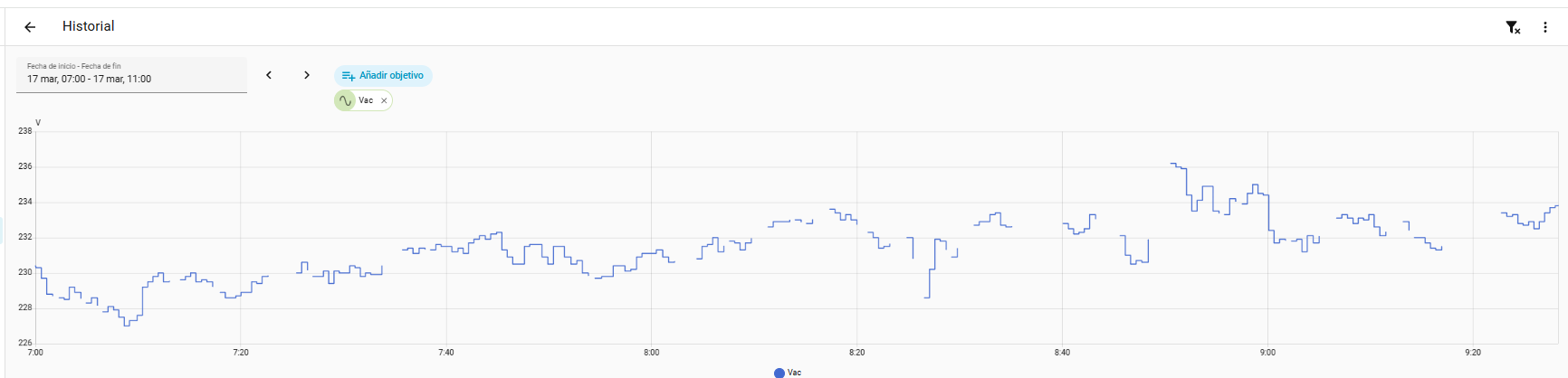
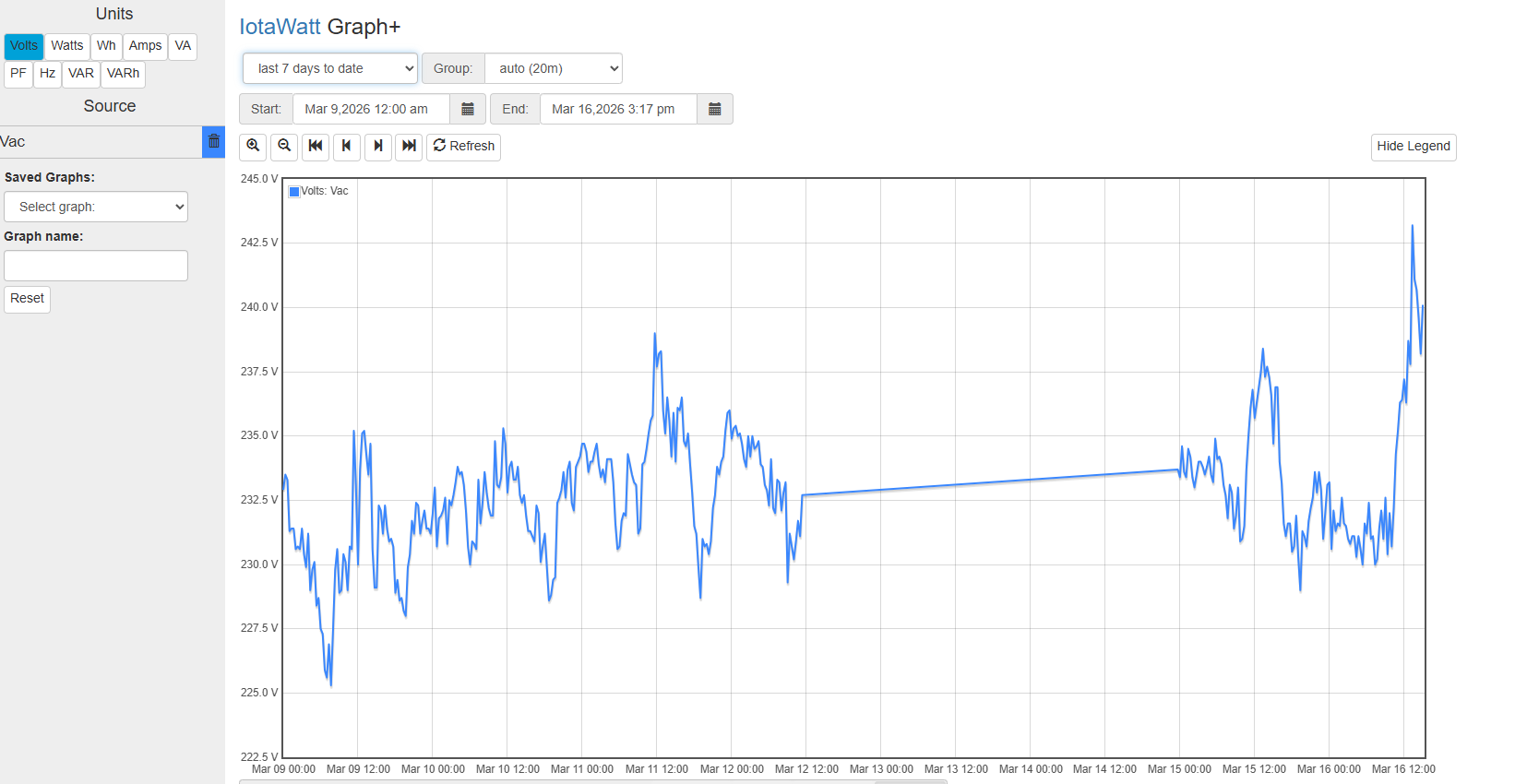
Can you post a graph of voltage for the13th and 14th?

Not suspected as the problem but you have the timezone set to 0. Are you in Europe?

Yes, I’m in Spain, I’ve changed from zone 0 to zone 1. I’ll send you the graph; you’ll see there are disconnections.

That’s not a disconnection, its not logging at all. This is a datalog issue. Whether its caused by an SDcard problem or something else is not clear. I’ve never seen an issue like this without some indication on the LED. Are you sure the LED was solid green on during the extended outage about noon on the 12th through about midnight on the 14th?

Hi
Yes, the LED is definitely solid green, and that’s what’s causing these problems with the green LED.
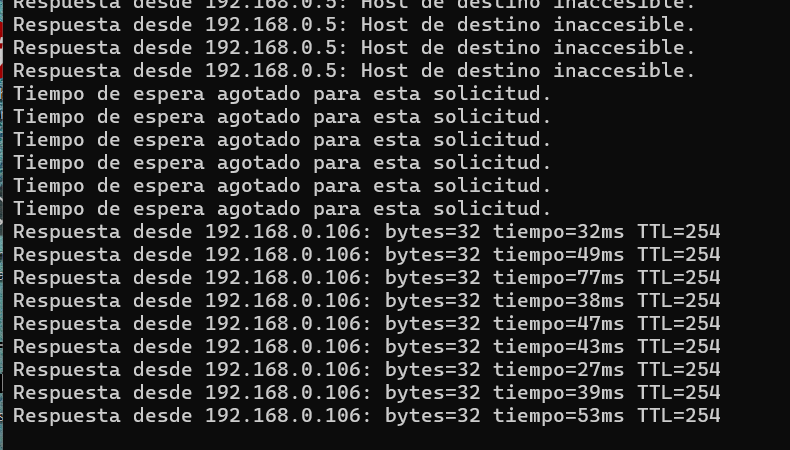
Look, you can see that when you ping it, it stops responding and then suddenly starts responding again, but the log doesn’t say anything about it having stopped communicating.

** Restart **

SD initialized.
3/16/26 14:32:27z Real Time Clock is running. Unix time 1773671547 
3/16/26 14:32:27z Reset reason: Software/System restart
3/16/26 14:32:27z Trace:  1:3, 1:3, 1:3, 1:3, 1:3, 1:3, 1:3, 1:3, 1:3, 1:3, 1:3, 1:3, 1:3, 1:3, 1:3, 1:3, 1:3, 1:3, 1:1[8], 1:2[9], 9:0[9], 9:0, 9:1, 8:4, 8:6, 8:8, 9:3, 9:5, 9:9, 1:3, 10:2, 10:3
3/16/26 14:32:27z ESP8266 ID: 15866494, RTC PCF8523 (68)
3/16/26 14:32:27z IoTaWatt 5.0, Firmware version 02_08_03
3/16/26 14:32:27z SPIFFS mounted.
3/16/26 15:32:27 Local time zone: +1:00
3/16/26 15:32:27 device name: IotaWatt
3/16/26 15:32:27 HTTP server started
3/16/26 15:32:27 timeSync: service started.
3/16/26 15:32:27 statService: started.
3/16/26 15:32:27 dataLog: service started.
3/16/26 15:32:29 dataLog: Last log entry 03/16/26 15:32:25
3/16/26 15:32:32 historyLog: service started.
3/16/26 15:32:32 historyLog: Last log entry 03/16/26 15:32:00
3/16/26 15:32:32 WiFi connected. SSID=xx, IP=xx, channel=1, RSSI -74db
3/16/26 15:32:32 Updater: service started. Auto-update class is MINOR
3/16/26 15:32:33 Updater: Auto-update is current for class MINOR.
3/16/26 17:32:58 Updater: Invalid response from server. HTTPcode: -4

Look at the number of outages between 7:00 and 9:00 AM today.
Do you think it could be the SD card?
Can you give me instructions on how to send a command to iotta to check the SD card?

Let me explain my network setup:

  1. I have an ADSL router where I’ve set the Wi-Fi to channel 1: The iotta connects directly to the router because it’s only 2 meters away.

  2. I have a mesh network with an Orbi configured as an access point (AP), set to Wi-Fi channel 6 (the iotta could connect to this AP as it’s also nearby).

  3. I have a TP-Link access point in the garage set to Wi-Fi channel 11 (the iotta can’t reach this AP; it’s too far away).

I have them on separate channels precisely to avoid problems, but I’m mentioning it in case the ESP32 has any issues working with these Wi-Fi devices.

Do you have any idea what might be happening?

That is not IoTaWatt graph+. It looks like gaps caused by communication lapses. Also, are you using an IoTaWatt uploader or some other method to accumulate that data?

What looks like a router log above shows differing IP addresses. The ESP8266 does not do well with changing IP addresses. Is it possible that the unit is switching between APs? If so, I think you need to restrict that from happening.

It seems I’ve found the problem.
The issue stems from the ESP32’s difficulty roaming between access points.
Even though the different access points have different channels, the ESP32 doesn’t seem to like it and gets lost, which is why the green LED on the Iotawatt remains lit.
Is there any new firmware that fixes this ESP32 problem? I understand it’s just a software issue and can be resolved.
I don’t think the best solution is to try to prevent the different access points from sharing a coverage area; this situation is very common in homes these days.

What do you think?

Well, now it’s failing again, so it seems it’s not the access points either.

Look, I can ping it, but web access isn’t working, and it’s not registering the parameters in Home Assistant.

I’m going a bit crazy with this problem.

I do think that your problem is your LAN topology, but I can’t help you with that. I don’t know if this ever worked for you, if it did when it stopped, what might have changed with your network or other related systems.

The home assistant integration typically uses the zeroconfig .local to resolve the IoTaWatt address. Those protocols, Bonjour (apple) and LLMNR(microsoft) rely on an underlying broadcast capability to which IoTaWatt responds with it’s current IP address. This is all deep in the IP stack provider by the ESP8266 IDE (not ESP32) and well below the scope of any of the IoTaWatt developed firmware.

It works fine in a typical single router configuration, and also in higher quality WiFi gear like Ubiquity. Many routers have optional security features to defeat the broadcast and identify protocols however. In your case, I see that you have at least three APs, all of differing brands. Moreover you suggest a mesh network. Mesh networks have been very troublesome for ESP SOCs. I also don’t know if with all the different pieces there could be more than one DHCP server active. In any event I definitely feel the problem is your network.

You suggest that AP switching should be more robust and that binding the IoTaWatt to a single AP would be excessively restrictive. I disagree. The IoTaWatt is not a phone or other mobile device. It is installed in a single place and is tethered by it’s many connections to CTs, VTs and the power supply. There is no reason why it should seamlessly switch to different APs. I asked at the beginning six days ago:

Received no answer. Please take some time to isolate the IoTaWatt or preferably stand up a temporary independent LAN with a single router and see if the problem goes away.

1 Like

Thank you so much for your response and for addressing the problem. I appreciate your help.

I’ll try what you recommended and test it.

What I don’t understand is that it hadn’t given me any problems until now, and my network didn’t change.

Anyway, I’ll create a separate network to see if that solves the problem.

Thanks again.